Taylor Simmons
If you sell materials like flooring, wallpaper, turf, or fencing, you know the hassle of translating a customer’s project area into the exact number of product units they need. Selling by the box or roll when your customer only knows their room’s square footage leads to confusion, manual calculations, and potential returns.
The good news? You can automate this complex process using Custom Product Builder apps on Shopify. These powerful tools allow customers to input dimensions (like length and width) and instantly calculate the required product quantity, transforming a complicated checkout into a seamless experience.
🛠️ The Challenge: Shopify’s Default Limits
By default, Shopify is designed for selling fixed-price, fixed-quantity products (variants). It doesn’t have a built-in function to handle a dynamic pricing structure where the final quantity or price is determined by a mathematical formula like Length x Width.
This is where custom product builder apps step in. They inject a calculator directly onto your product page, allowing for dynamic input and formula-based pricing or quantity calculation.
🔑 How to Set Up Square Footage Calculation
The key to this setup is finding an app that supports formula-based calculations using customer input fields. Apps (custom or third-party) are often used for this purpose.
Here’s the general setup process you’ll follow within your chosen app:
1. Create the Input Fields
Your customer needs a way to tell you the size of their project.
Field 1: Length Input – A number field where the customer enters the length (e.g., in feet, meters, or inches).
Field 2: Width Input – A number field where the customer enters the width.
Optional: Unit Selector – A dropdown for the customer to choose between feet and meters, or inches and centimeters, which will impact your calculation formula.
2. Define the Calculation Formula
This is the core of your setup. You will use the app’s formula builder to define the relationship between the inputs and the final product quantity.
Scenario A: Calculating Total Quantity of Units
Let’s say you sell flooring tiles, and each box covers 24.3 square feet. The customer needs to know how many boxes to order.
After calculating, the app will then take the result and feed it into the cart’s quantity selector. Most high-quality apps will also include an option for automatic rounding up to the nearest whole number to ensure the customer always orders enough full boxes.
Scenario B: Calculating Dynamic Price (Price Per Square Foot)
If you sell custom-cut wallpaper at $2.50 per square foot, the total price changes based on the customer’s dimensions.
The app will dynamically update the product price displayed on the page before they add it to the cart.
3. Apply Conditional Logic and Constraints
This step ensures accuracy and prevents impossible orders.
- Minimum/Maximum Orders:
- Set a minimum input value (e.g., you won’t cut anything under 10 sq. ft.) to protect your profit margins.
- Damage/Waste Allowance:
- Offer an optional checkbox for customers to automatically add a small percentage (e.g., 10% for waste) to their total area calculation.
- Unit Rounding:
- As mentioned, enable the “Round Up” function to ensure customers buy complete boxes/rolls instead of a partial quantity.
✨ The Benefits of Automation
Implementing a square footage calculator does more than just save you time.
- Boosted Conversion Rates:
- Customers don’t have to leave your site to use an external calculator, reducing friction in the buying process.
- Increased Accuracy & AOV:
- By automating the calculation (including rounding and waste allowance), you ensure the customer orders the correct amount, leading to fewer returns and often a slightly higher Average Order Value (AOV).
- Improved Customer Experience:
- It positions your brand as professional and user-friendly, providing transparency on exactly what they are purchasing for their project size.
If your Shopify business involves any made-to-measure or area-based products, leveraging a custom product builder with formula capabilities is not just a luxury—it’s an essential tool for scaling your operations and satisfying your customers.
See It In Action
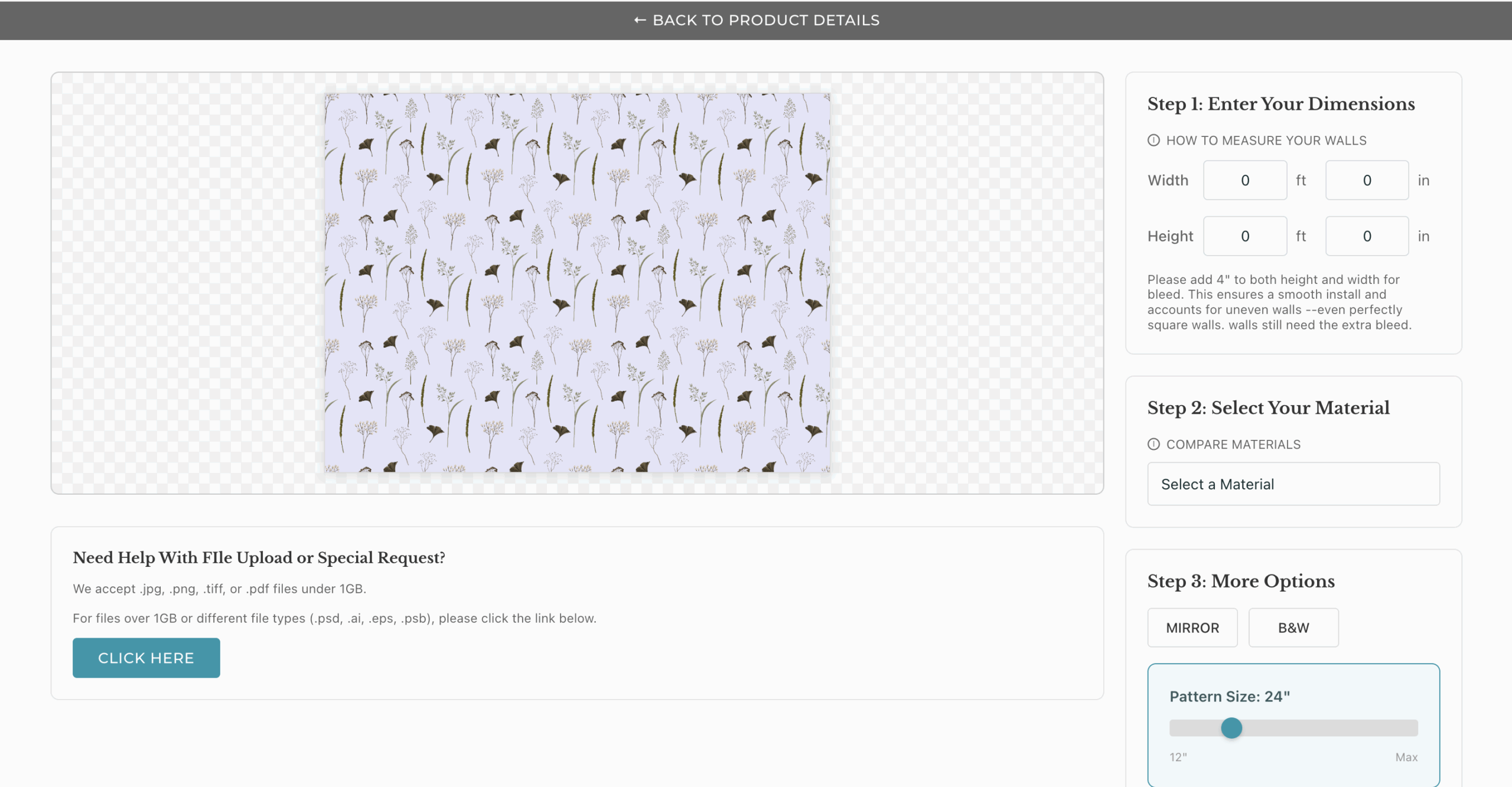
Fyresite client Applied Coverings came to our team for help. One of their requests was to create a custom product builder to allow customers to buy wallpaper based on the dimensions of their walls. Here’s how it looks:
Ready to Sell Better With a Custom Product Builder?
Fyresite is a Shopify Plus partner who has worked with merchants across industries. To learn how we can help you, schedule your free consultation.